Open the Binance sign-up page with invite code BN7796 already attached. Signing up through it cuts your trading fees by up to about a fifth, and the more you trade, the more that adds up. If the invite field on the page is empty, type BN7796 in yourself.
This is a promotional link. Crypto trading carries risk, and this is not investment advice.
Creating the account takes a few minutes; identity verification means photographing a document and a short face scan. Only three things tend to go wrong: the invite code goes missing, verification gets sent back, or two-factor authentication never gets switched on.
What to have ready
First, an email address or phone number that only you use. Codes arrive there at sign-up and every time you withdraw, so do not borrow a relative's number, and never forward a code to someone offering to “register for you.”
Second, a valid ID in your own name and your real home address. A passport, national ID card or driving licence is usually accepted; which ones appear depends on the country you choose. The document must be in date, and your name should be entered exactly as it is printed.
Third, a few uninterrupted minutes somewhere with good light. The face check asks you to turn your head or blink at the front camera, and backlight or a dim room is the most common reason it fails.
Also make sure Binance serves the place you live. Some countries are excluded; US residents, for example, are served by the separate Binance.US and cannot use this sign-up page. Choose your real country of residence. Registering with a false address causes problems later, at verification and at withdrawal.
A six-item sign-up checklist
Tick all six before you click the link and you are unlikely to get stuck halfway.
Binance sign-up checklist
0 / 6 checkedTicks are saved only in this browser. The checklist has no input fields and collects no email, phone number, ID or code.
Sign-up, step by step
You can register on the website or in the app. On a phone, the least error-prone route is to open the invite link in your browser, finish registration there, and only then install the app and log in.
- Open the sign-up page. Use the invite link at the top of this page and choose email or phone number.
- Enter your email or phone. Tick the box to accept the terms, but do not press continue yet.
- Check the invite code. Further down the same page there is a “Referral ID (optional)” field, sometimes collapsed until you tap it. If you arrived through the link it usually already shows BN7796; if it is empty, type it in and check each character.
- Enter the verification code. A six-digit code arrives by email or SMS and expires after a few minutes; request a new one if it lapses.
- Set a password. Follow the on-screen rules, use a long password you have never used elsewhere, and keep it in a password manager.
- Start identity verification. The home screen will prompt you to verify. Until you do, most deposits, purchases and withdrawals stay locked.
If the invite code did not carry over, or you forgot it
The image below comes from Binance's public registration tutorial. It shows the inviter option and an empty Referral ID field. If your screen looks like this, enter BN7796 before you continue.
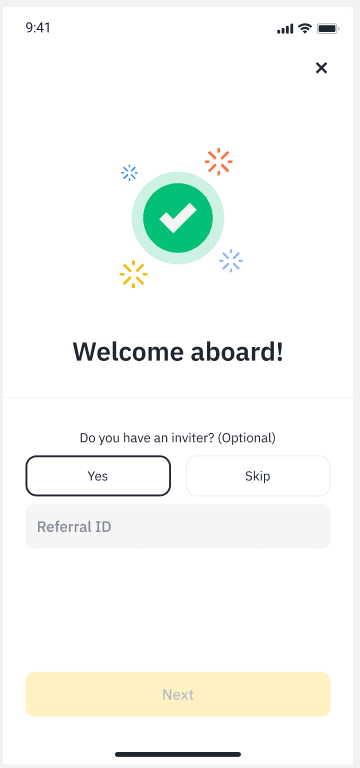
The code usually goes missing when you switch devices or entry points: you click the link on a laptop but finish in the phone app, or you leave halfway and come back through the app's home screen. The code in the link does not always follow you. A quick look at the field before you submit saves a lot of trouble later.
Once registration is submitted, the code cannot be added, and an account in use cannot switch to a different referrer. The one exception is an old account: if you have a verified Binance account that has sat completely unused for 180 days in a row, logging in through a referral link lets you attach a new code. Do not close an account or open a second one for the discount; one person, one account is the platform's rule, and breaking it can put existing funds at risk.
Getting identity verification through the first time
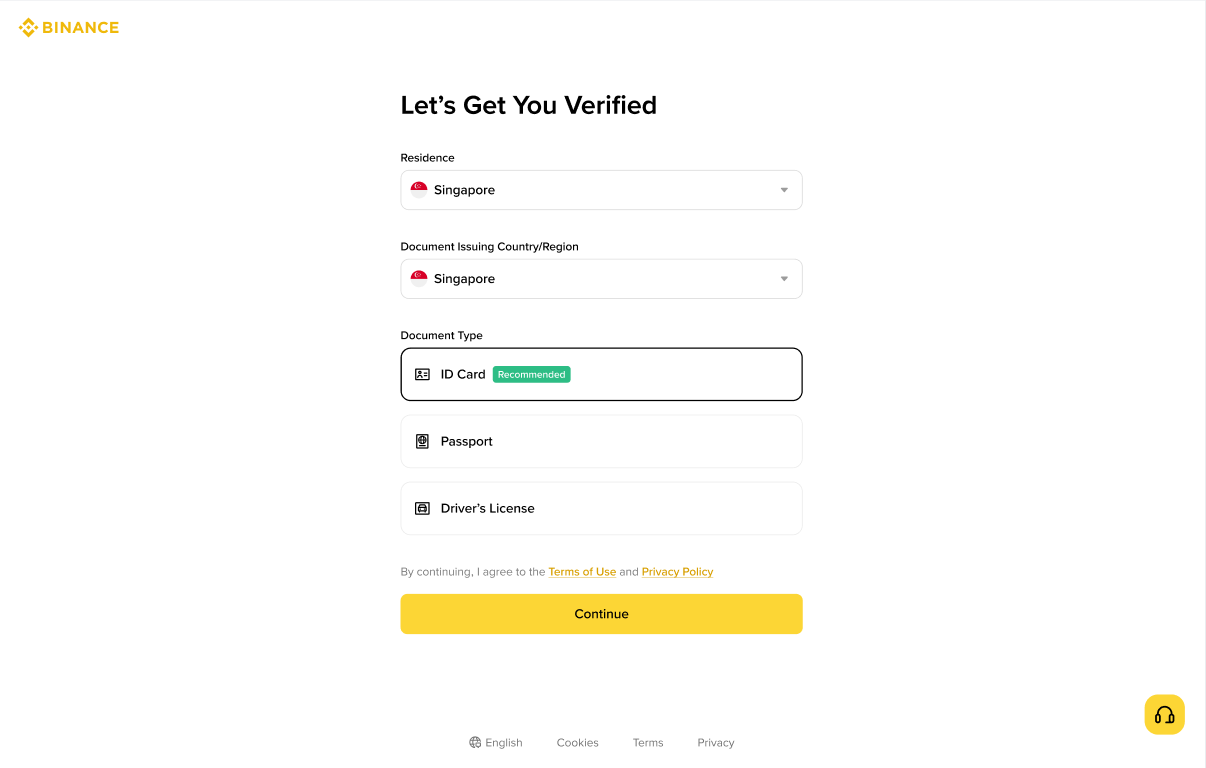
The first verification screen asks for three things: country of residence, where your document was issued, and the document type. The example below uses Singapore purely as a demonstration. Choose what is true for you; the page only lists documents accepted for your country.
Rejections come down to a handful of causes. Check these before you submit:
- Blurry or glaring photos. Lay the document flat on a dark surface, get all four corners in frame and switch the flash off.
- Details that do not match. Your name and date of birth must match the document exactly, and your residence should be where you live now.
- Expired or incomplete documents. Use an original that is in date; photocopies and photos of a screen get rejected.
- A failed face check. Move to even light, take off hats and sunglasses, and turn your head slowly as prompted.
After you submit, the result appears on the verification page of your account. It can take minutes, or longer if a person reviews it. If it is sent back, the page says why. Fix only the item it names and resubmit, rather than trying different documents at random.
Security settings to switch on right away
Hold off on depositing for five minutes. All three are in your account's security settings.
- Two-factor authentication. Use an authenticator app or a passkey rather than SMS alone; an SMS-only account is exposed if someone takes over your phone number with a SIM swap. Give your email a separate password and two-factor as well, because password-reset links go there.
- Anti-phishing code. Choose a phrase and every genuine Binance email will include it. Anything claiming to be from Binance without it goes straight to the bin.
- Withdrawal whitelist. Once it is on, crypto can only be withdrawn to addresses you added in advance, so a stolen password alone is not enough to send your coins somewhere else.
The usual opening move from scammers is a fake support agent: your account has been “flagged,” please read out your code, or pay an “unlock fee” first. If you get a message like that, follow the steps in scams and account safety.
Buying your first USDT and testing the way out
Once verified, most people buy in one of two ways.
P2P trading means buying from an individual seller with a local bank transfer or a common e-wallet. Binance holds the seller's USDT in escrow until the seller confirms your payment. It is usually cheaper than a card. Pick sellers with many completed orders and a high completion rate, and keep every message inside the order chat.
Buying with a bank card takes a few taps and suits small amounts, but the fee is normally higher than P2P. Check how much USDT you will actually receive before you confirm.
Buy only enough for one round trip. Then follow how to cash out stablecoins to sell part of it back and withdraw to your own bank account. When the money reaches your account, the route is proven.
On fees: Binance's standard spot trading fee for regular users is currently 0.1%, and paying with BNB takes 25% off that. Accounts opened through a referral link get the referral discount on top. To see what a currency conversion is costing you in spread, run the numbers in the spread calculator.
When something gets stuck
| Problem | Try this first | If it still fails |
|---|---|---|
| No email code | Check spam and filters, confirm the address, wait a minute and resend | Register with a phone number, or contact live support |
| No SMS code | Check the country code and signal, and turn off SMS blocking | Register with email instead |
| “Account already exists” | That email or number is registered; use “Forgot password” | Do not open another account |
| Slider or captcha keeps failing | Try another browser, disable translation and ad-block extensions, change network | Wait a while and retry |
| Your country is not listed | The service is not offered there | Do not register with a false address |
| Verification sent back | Read the reason and fix only that item | Ask support before resubmitting |
Common questions
Sources
The two screenshots come from Binance's public registration and verification tutorials; the interface changes between versions. Spot fees and the BNB discount come from Binance's fee page, and the two-factor advice follows the UK National Cyber Security Centre.